Sony’s professional cameras are highly customizable. With few exceptions, any function can be assigned to any button or dial. While this can be intimidating at first, it allows you to make the camera work exactly how you want, for the kind of shooting that you do.
Rear Controls
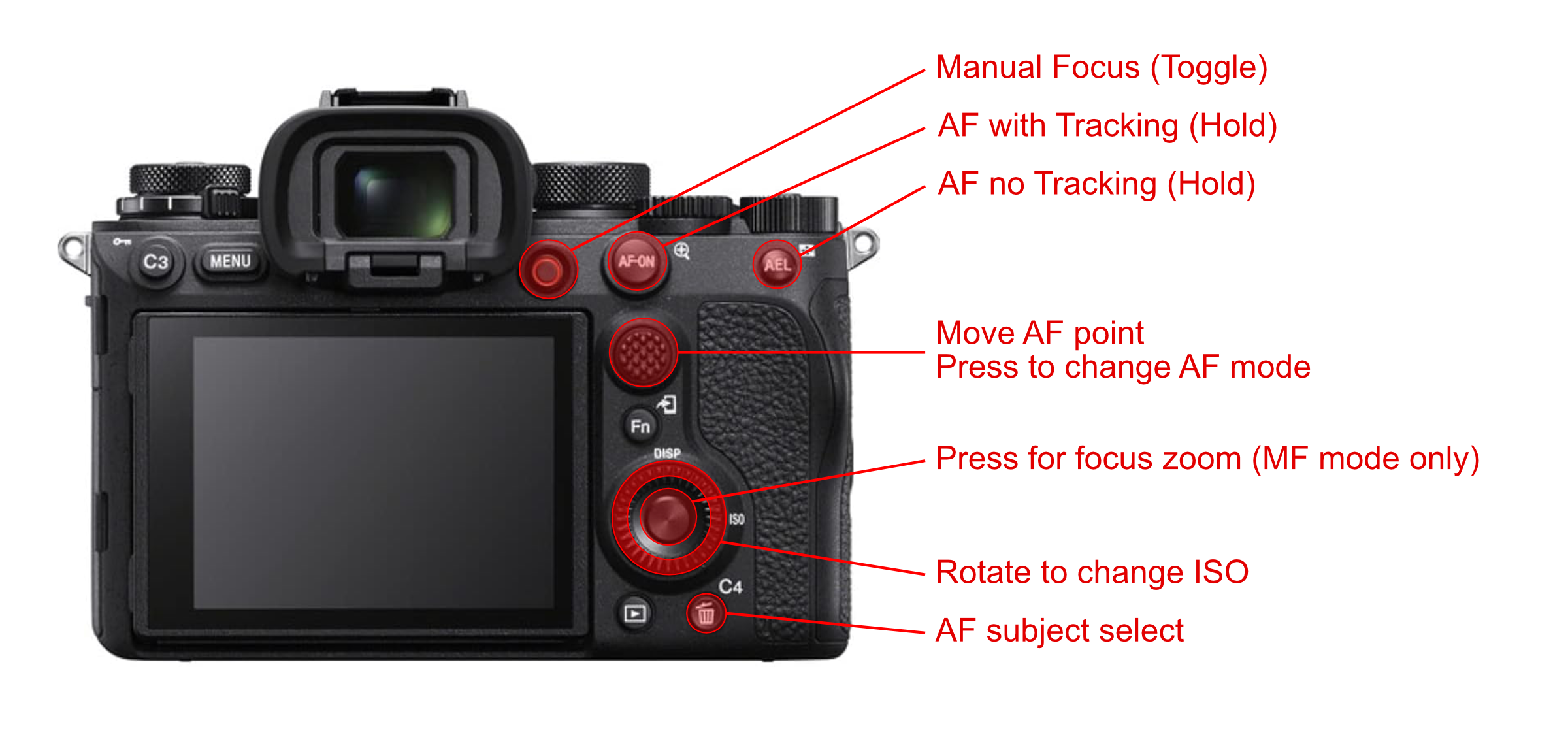
Focus Buttons
I use almost all of the rear buttons for focusing.
I’ve set up my camera for back-button focus, with two different modes possible. That means when I half press the shutter button, the camera’s focus doesn’t change. If I press the “AF On” button or “AEL” button, then it automatically focuses for as long as I have the button pressed down.
Both the “AF On” and “AEL” buttons enable automatic focus, with the difference being that the AF On button also enables tracking, while the “AEL” button doesn’t. I use the tracking mode when I want the camera to lock on to the eye of the animal I’m photographing. I use the no-tracking mode when the camera is having a hard time recognizing the animal in the frame (or if I’m not trying to focus on an animal).
Making this work requires disabling all of the autofocus modes that automatically enable tracking. More on that below.
I default to letting the camera find and track subjects by using the AF On button to focus. If I notice the subject recognition struggling, I just need to move my thumb a half inch to the right, press AEL instead, and take full control of the autofocus process.
I spend most of my time in flexible spot autofocus mode. That means the camera will try to focus on whichever animal’s eye is under or in the immediate vicinity of the point I select. If I want to change autofocus modes (for example, letting the camera look anywhere on the screen for an animal), I press down the joystick to change modes. When I’m in a mode that allows moving the focus point, I have the joystick set up to move that point.
Sometimes, I want to switch into manual focus mode. In theory, I’m kind of already in manual focus mode if I’m not pressing a focus button, but this is where some limitations of the Sony cameras come into play:
- Focus peaking is only available in manual focus mode
- Focus assistant (zooming in to check focus) is only available in manual focus mode
- On lenses that don’t have a “Full-Time DMF” switch, you can’t use the focus ring to change focus while in automatic focus mode
I have the button to the right of the viewfinder set up to toggle in and out of manual focus mode. On the Sony A1, this button defaults to movie record. Sony moved the movie record button to the top of the camera on more recent cameras and made the button to the right of the viewfinder the “C1” button. Since I switch between different bodies, I keep manual focus on the same button everywhere.
Finally, I use the “trash” button to toggle between bird and animal eye detect. I’ve disabled human eye detect (see below).
ISO Dial
By default, Sony’s cameras need you to press a button to enable ISO adjustment. I find that too cumbersome, so I’ve configured to rear dial to always control ISO. If I scroll it all the way counterclockwise, it enables automatic ISO. Turning clockwise from auto ISO selects the base ISO and then increases from there in 1/3 stop increments.
Disabling Unused Modes
I’ve disabled a bunch of modes that I never use across the system.
Focus Modes
I’ve disabled all of the focus modes with tracking. That’s essential to make my tracking on/off back button autofocus buttons work.
In addition, I don’t need the flexibility of all the different autofocus modes. For example, flexible spot small and large are sufficient. I also don’t need flexible spot medium and expand flexible spot. So, I’ve disabled those autofocus modes.
Autofocus Subjects
I so rarely use my camera to shoot people that I’ve disabled human autofocus subject detection. Instead, I can use a button to quickly toggle between birds and animals. If I notice the autofocus struggling because I have the wrong subject selected, a single button press will get me the correct one.
Monitor and Viewfinder Display Modes
Only some of the display modes are useful in my day to day shooting. Similar to the autofocus subjects, I’ve disabled the modes I don’t use very often.